Archive - August, 2010

Paper Crane

I checked another one off my 30 Before Thirty list today; I made an origami paper crane while Eleanor took her morning nap.

Paper Crane

I’m thoroughly impressed with those that have made 1000 paper cranes, as Blair from Wise Craft has recently done. As for me, I’m happy with my single crane, the first I’ve ever made.

Silhouette SD Cutting Machine (Review and Giveaway)

I mentioned wanting a Silhouette SD a few months ago after reading Melissa’s review of it, and much to my delight the company sent one to me to try out. Well I’ve been having so much fun with mine that I thought you might want one too, so I’m giving one away! Details are at the end of this post, but first let me show you a couple of things that I’ve made with it and tell you about my experience with the machine.

You know the little vinyl stick figure families that mark the back windows of minivans throughout suburbia? Yeah, this is my take on that. More modern, less cutesy.

Family Silhouette Car Decal

I used Adobe Illustrator to trace a silhouette of us, basing it on a photo from the shoot by James Julius. Of course, it’s only going to be accurate for another six months and then I’ll have to make a new one for my family of four.

I also framed Eleanor’s silhouette (the same silhouette I drew for her first birthday invitations) against a sheet of patterned paper.

Eleanor's Silhouette

So cute, right? And I could think of a million more things to make too… I especially like the idea of using it to make a stencil for decorating a pan of brownies with powdered sugar, but I think that’s just because I’ve been craving chocolate lately. ;)

My Review of the Silhouette SD

The machine itself is small, sleek, and well-designed. The interface is easy, and I had no problems following the directions to get the machine up and running. The software is not Mac friendly, but there is an Adobe Illustrator plugin for Mac users (and a helpful tutorial here). I like to make my own designs anyway, so the Illustrator compatibility is perfect for me.

I was impressed by the Silhouette SD’s accuracy and ability to cut finely detailed images. I found only two drawbacks: the machine is noisy when cutting, and the sticky cutting mats attract hair and dust particles like crazy. Certainly not deal breakers, but worth mentioning.

I’m pretty excited about all of the things I can make, so I’m really pleased with the machine. There are tons of ideas and tips on the Silhouette SD site, shop, and blog. I’m not sure how the PC software works, but if you use Adobe Illustrator like I do then you can use any font or vector image you like. Nice.

Enter to Win a Silhouette SD

If you would like to win a Silhouette SD of your own, just leave a comment on this post (one entry per person). This giveaway, open to US residents only, includes: A Silhouette Machine (a $299.99 value), software for Windows XP/Vista, power cable and USB cable, two cutting mats (one for thick media, one for thin media), one cutting blade, $10 gift card to the Silhouette Online Store. One winner will be chosen randomly on August 31.

And if you just can’t wait to see if you’ve won, I also have an awesome promo for you (good from August 23 through September 1 at midnight). If you buy a Silhouette cutting machine and enter the discount code “lovely“, you’ll get all of the above plus the following for $249.99: $50 off the Silhouette Craft Cutter, fuzzy white vinyl (valued at $7.99), light blue smooth heat transfer (valued at 14.99), yellow flocked heat transfer (valued at $14.99), and a home décor CD (valued at $50). That’s a total savings of $137.97!

You can also use the code “lovely” from September 2 through September 4 for a good discount of $50 off your machine, two cutting mats (one for thick media, one for thin media), one cutting blade, $10 gift card to the Silhouette Online Store, plus two free rolls of heat transfer (a total savings of $79.98).

Good luck! I’d love to know what you’d make with your Silhouette SD. And what did you think of my projects? Would you rock a family car decal like mine? Too close to the ubiquitous stick figures? Or do you (gasp) prefer the stick figures?

August 31: Comments (and entries) are now closed. The randomly chosen winner is Renanda (renparks). Congratulations, Renanda!

Oh, Friday

Today is turning out to be kind of a mixed up day for me. Plans fell through, my work hours have changed, etc. I’m going to get as much done as I can, and as quickly as I can, and then I’m taking the rest of the day off. A good plan for a Friday, yes?

So… Have you been watching this season of Design Star? This year’s format has been odd but I’m glad that Emily, my favorite designer, is in the final two. Did you see her room from last week? It was the best one of the season.

I hope she wins the whole thing. Emily has a blog too; I just found out recently.

I’ll see you back here on Monday and I’ll have a pretty neat giveaway for you. If you’re at all crafty (or even if you just aspire to be), you’re definitely going to want to win.

Making Room for Baby

Among all of the congratulations (thank you!), one question is popping up repeatedly. How are we going to make room for another baby? After all, our hundred-year-old bungalow is just 1400 square feet, and I run my stationery business out of it.

My Studio

My sweet, colorful, lovely little studio is going to move into the scary basement. I’ll miss you, studio!

I’ll be honest. I’m pretty sensitive to my surroundings, so working in our unfinished basement is going to be a bit depressing. Plus I scare easily and I think my assistant Erika might too, and I can see us both being weirded out by spending time down there. It IS a little spooky, but we don’t have any other options.

IMG_1252.JPG

Eventually Brandon and I would like to put up drywall and make the lower level feel like the rest of our home, but we don’t have the budget right now. We’ll clean it up and arrange things as best we can, but I fear it will still be icky.

*Update*
I mentioned the basement walls in a couple of the comments below, but here is a photo. Unpaintable, bizarre crackled tiles. No ceiling either, and wires everywhere. Here’s a link to view the photo in a larger size.

Basement Walls

My studio will become Eleanor’s new room though, and that will make me happy. It’s going to be adorable! And the room (12×12) feels so much bigger than her current space (7×14 with sloped ceilings), so that will be nice for her. The nursery will stay a nursery since it works really well as such. I do plan to make at least a few changes though, regardless of gender. I want the new baby to have a look of his/her own.

Eleanor's Nursery

Now all of this puts greater urgency on #9 of my 30 Before Thirty list: Clean out the basement. All of this shuffling of space hinges on getting it ready, and I am SO not looking forward to that task.

The Farnsworth House

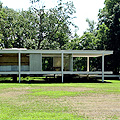
Number 18 on my 30 Before Thirty list: done. Visit The Farnsworth House by Mies van der Rohe.

The Farnsworth House

It was beautiful, but SO impractical. There was a lot of client/architect drama between Edith Farnsworth and Mies van der Rohe. Ms. Farnsworth claimed that the house was unlivable (it had almost no storage), and the price skyrocketed as work progressed. Mies took the stance that it was a getaway house and you should have little more with you than a change of clothes, therefore it doesn’t need to be practical.

The Farnsworth House

Still, The Farnsworth House was amazing. It’s constantly under threat of flooding, so go see it sooner than later if you’re able.

Page 2 of 5«12345»